VinaCaptcha - ALL IN ONE Captcha entry software, support multiple ID, multiple Server! |
- Product name: VinaCaptcha
- Version: 3.2.3
- How many website which you can use this software to entry captcha?
- Version: 3.2.3
- How many website which you can use this software to entry captcha?
|
|


Features
+ Support work with multiple account in one software. + Support work with multiple server in one software. + Support add unlimited account in one software. + Support check upgrade version live. + Speed up captcha loaded for you entry 24/7 hours. + This software is small, layout friendly user. + Support multiple theme type: one panel, two panel, vertical and horizontal. + Support resize able. Zoom in, zoom out. + Support compression, gzip. extract the captcha zip or gzip, to speed up loading captcha. + Display full information of account: status, total captcha, total earn, rate, timeout. + Support security account management with private password, other people will can not read it. + Support many options and settings such as Auto Skip, Auto Pause, Auto Text, Auto Fix,... + I always listen you about the changes of the captcha website to update it asap. Click Below Link And Download Software |
Price
+ $0.6 per Monthly per PC. + If you order key for team work, please ping me YM: vinacaptcha + Free trial 1 day, please ping me YM: vinacaptcha |
Quick help
+ Choose a Theme type to work: Click Settings > General > ThemePanel = Default | VerticalPanel | HorizontalPanel. + Click button [Add] to add your account into software. + Select a account row and see account properties right under account panel. + Select a account row and click button [Delete] to remove your account from software. + Checked some account and click button [Start] to work. + Click button [Stop] and entry left captchas before exit software |
User Guide
- Theme: + We have 3 themes display panel to use for easy see the captcha and type good better. + You can adjust theme here: Settings > General > ThemePanel = Default | VerticalPanel | HorizontalPanel + Default: only display one captcha panel, like this below picture: 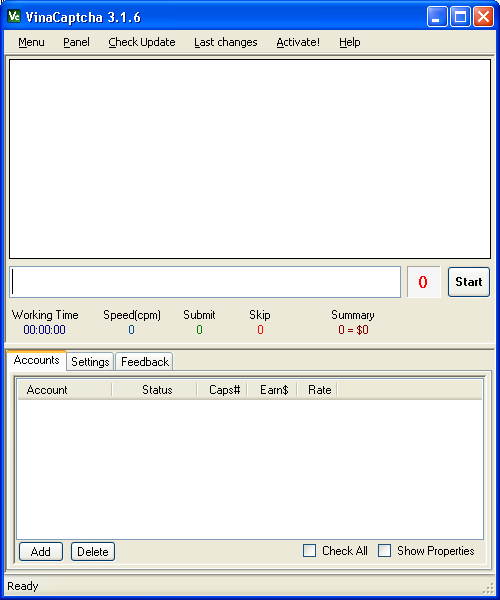  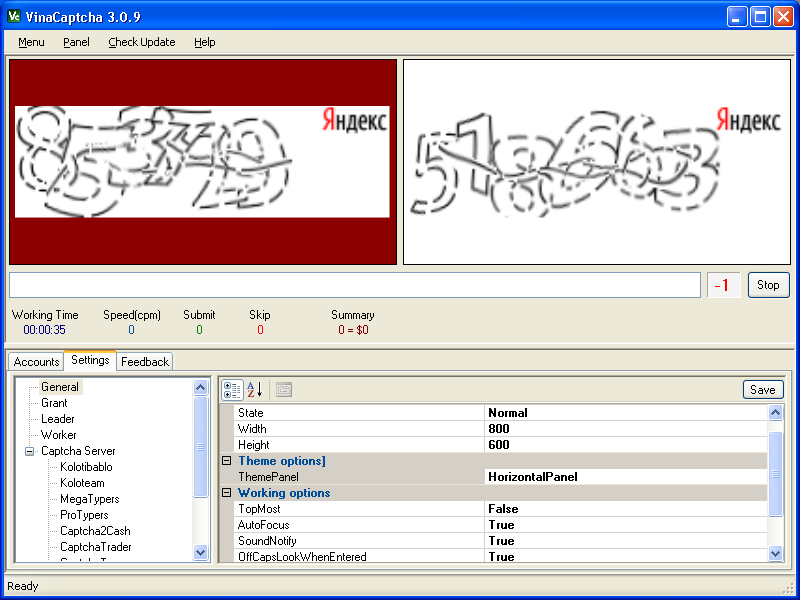 |
- Picture show on panel type:
+ When use theme two captcha panel you can adjust captcha picture display. + Settings > General > PicturePanelType = TopOnly | BottomOnly | Switch + TopOnly: Fixed panel 1 as captcha entry, panel 2 become queue captcha. + BottomOnly: Fixed panel 2 as captcha entry, panel 1 become queue captcha. + Switch: switch captcha entry between panel 1 and panel 2. - Account Management: + Click [Add] button to add account, selecte server name, enter username, enter password then click [OK]. + Select one or many account row then click [Delete] to remove accounts. + To see all property of one account, click select one account row and see property grids under. + Select one account and you can adjust some property and click [Save] to keep it for next time. + If click [Save apply to all], it will save all property of account selected to all other accounts. - Account of Server: + Server: chose a server website for this account. + Username: enter your account. + Password: enter your password. - Account Server Infor: + CaptchasCorrect: display total captcha resolved correctly from server. + CaptchasIncorrect: display total captcha resolved incorrectly from server. + CaptchasTimeout: display total captcha timeout from server. + Earn: display total money from server. + Rate: display basic rate from server. + Priority: display basic priority from server. - Account Working Infor: + CaptchasSubmit: display total captcha which you resolved. + CaptchasSkip: display total captcha which you skipped. + PendingSeconds: display number of seconds waiting captcha from server. - Auto Fix: + AutoFix: enabled(True) or disabled(False) the function fix warning from server. + FixMinuteInterval: number of minute to trigger this function. - Auto Pause: + AutoPause: enabled(True) or disabled(False) the function pause. + PauseWhenTimeoutCounter: number of skipped to trigger this function. - Auto Skip: + AutoSkip: enabled(Skip) or enabled(Enter) or disabled(None) the function skip or enter. + SkipWhenTimeout: number of seconds timeout left to trigger this function. - Auto Text: + AutoText: enabled(True) or disabled(False) the function auto input captcha text when this captcha come back again. + EnterWhenAutoText: enabled(True) or disabled(False) the function press Enter when captcha text already input. - Auto Trace: + AutoTrace: enabled(True) or disabled(False) the function auto trace a account POST and GET. + BUT not ready to work. - Auto Synchronize: + SynInforMinutesInterval: number of minute to trigger the function update captchas, earn and rate. - Browser User Agent: + BrowserUserAgent: chose a Browser with User Agent such as Firefox, IE, Chrome, Opera and Safari. - Captcha Timeout: + TimeoutSecondsLimit: number of seconds timeout limited from server. - Network Proxy: + ProxyAddressPort: like this IPAddress:Port, used for some project as Pixprofit. + Do not support Proxy Authorize now. - Settings: + ThemePanel: Default(1 captcha panel) | VerticalPanel(2 captcha panel) | HorizontalPanel(2 captcha panel). + TopMost: Keep window always on top. + AutoFocus: Flash or Jump pointer to this window if it do not activate. + SoundNotify: Play a sound when captcha came. + OffCapsLockWhenEntered: Off CapsLock if it already on when you pressed Enter. + PicturePanelType: TopOnly(fixed panel 1) | BottomOnly(fixed panel 2) | Switch(switch between panel 1 and panel 2). + PanelBackgroundColor: Change color for background of captcha panel focused. - Update new version: + Support live update software, it automatic update when you accept upgrade software. + Automatic check update when software startup. + Click menu "Check Update" to check version, to upgrade software. - Last changes of version: + Everything last updates of software you can see it here: click menu > Last changes. - Trouble and Feedback: + When you have a trouble with this software, please capture screen and find me follow contacts: + YM: vinacaptcha + Email: vinacaptcha@gmail.com - Tips for working good better: + MegaTypers: + CaptchaTypers: + . . . |
